
Bookstack
What is Bookstack?
It's what you are looking at! Bookstack is a documentation tool used for internal guidance or procedures, which both helps new people when they join the team but also can serve as a reference for anyone who needs a refresher on something we do often.
Bookstack is organised as a hierarchy, similar to a bookshelf. Each page is like the page of a book, and that can either be directly in a book or in a chapter. Each book can then be inside of a shelf for easy navigation. Pages can link to other pages or books, and books can be in multiple shelves if they are relevant to multiple areas.
How do I access the Bookstack?
This page is the only page visible to users who are not logged in. In order to see the rest of the documentation, you first need to log in.
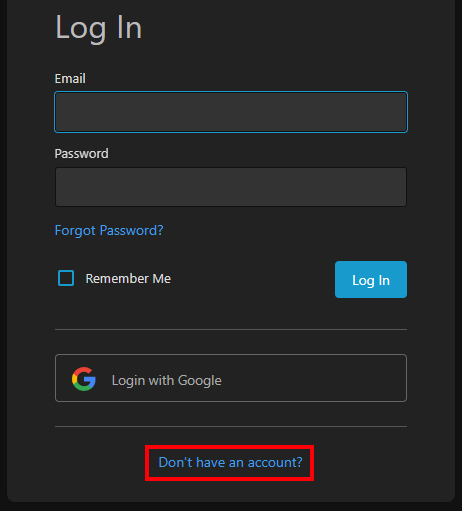
If you have an account already then logging in as simple as clicking the "Login with Google" button on the login page. Make sure you log in with your work email, and you should be good to go.
I got an error saying "This Google account is not linked to any users"!
If you get this error, it's because your account is not set up in Bookstack. If this happens, on the main page click the "Don't have an account?" button, and then the "Sign up with Google" button. This will prompt you to sign in with your work email.
|
|
|
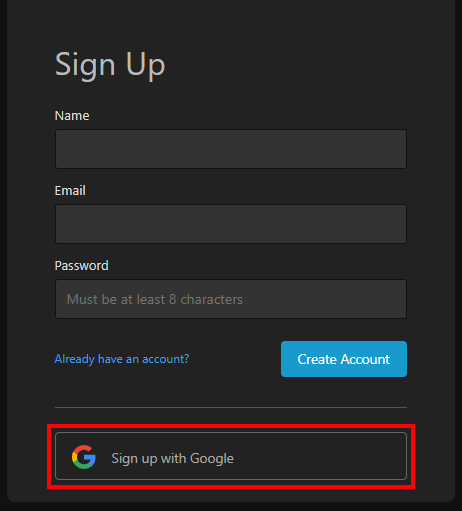
After this, you'll receive an email asking you to verify your account. Once this has been done, you should be able to log in as intended.
No comments to display
No comments to display